![Rebel_logo_white_transparent_520x186_x2.png]](https://rebelinternet.uk/hs-fs/hubfs/Logo/Rebel_logo_white_transparent_520x186_x2.png?height=40&name=Rebel_logo_white_transparent_520x186_x2.png)
Your Plume Home app includes a built‑in Adblocker designed to protect your privacy by stopping advertisers from tracking your online activity. When enabled, it helps hide your browsing behaviour and reduces targeted advertising.
Below is everything you need to know about turning it on — and what to expect when using it.
How to Enable Adblocking
- Open the Plume Home app.
- Navigate to Guard (your network protection hub).
- Find Adblocking and toggle it On.
- Wait a few moments for the change to apply.
That’s it — your network will now filter out advertising trackers.
Important Notes About Adblocking
While Adblocking is a powerful privacy tool, it can occasionally affect your browsing experience. Here are a few things to keep in mind:
• Some websites may not load correctly
Adblocking can interfere with page layout, videos, interactive features, login boxes, or purchasing pages.
• Certain websites may refuse to load entirely
Some sites require ads to function and will block access if they detect an adblocker.
• If a website you enjoy is blocked
Simply return to your Plume Home app, turn Adblocking Off, and then restart your Rebel router for the change to fully take effect.
This will immediately restore normal access.
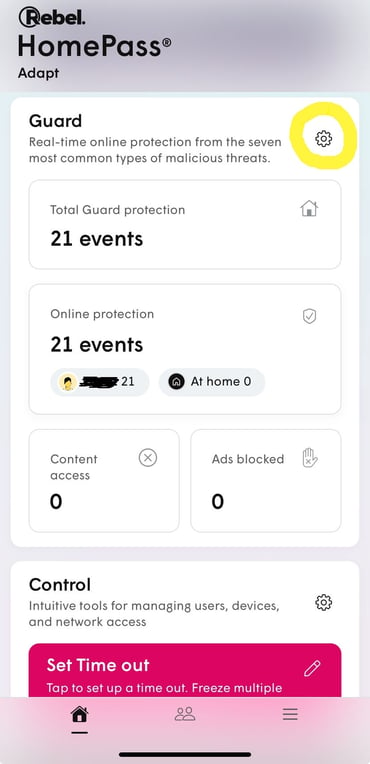
- On your Plume Home homepage, scroll down to the section titled “Guard” and press the gear button on the right.
- Click on “Adblocking” and enable it.
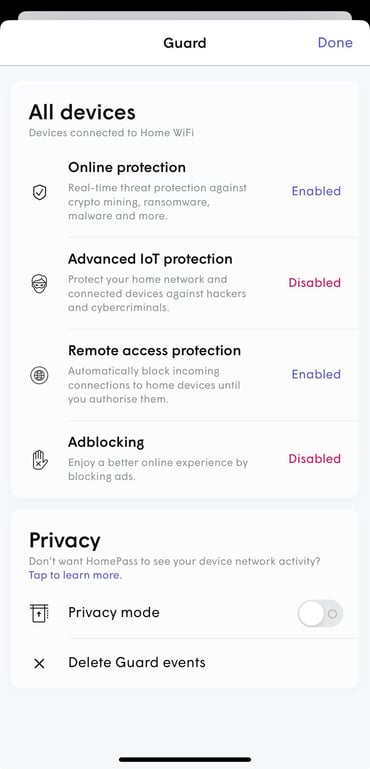
That’s it! Your home network is now protected from intrusive adverts.