![Rebel_logo_white_transparent_520x186_x2.png]](https://rebelinternet.uk/hs-fs/hubfs/Logo/Rebel_logo_white_transparent_520x186_x2.png?height=40&name=Rebel_logo_white_transparent_520x186_x2.png)
Is today your activation date?
If today’s your start date, please check out this guide first:
Why am I not online? My start date is today.
Connected before or past your activation date, but still seeing a red Internet light?
If your Internet light is red and your DSL or WAN light isn’t on, let’s check your cables:
For Copper (Rebel Fibre)
- Make sure the DSL cable is plugged into the DSL port (third from the left) on the back of your router and the other end into your Openreach Master Socket.
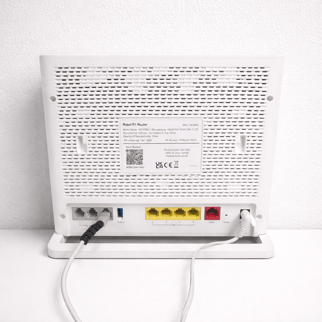
- If everything looks correct, unplug both ends, wait 60 seconds, then reconnect.
- Some Master Sockets have a removable front plate with a smaller socket behind it. If yours does, remove the plate and use the microfilter we provided to connect to that smaller socket.
For Full Fibre (Rebel 115, 330, or 1000)
- Check that your Ethernet cable is connected to the red WAN port on the router and to your Openreach ONT.
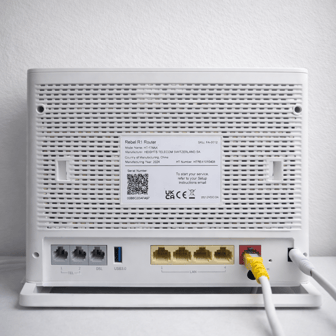
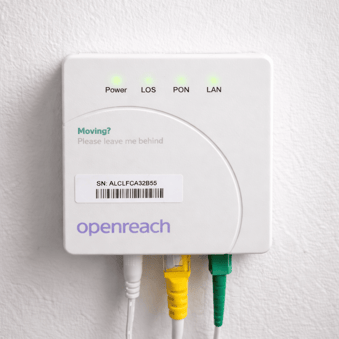
- Make sure the ONT is powered on (green light showing) and the LoS light is NOT red.
-
If the LoS light is red, please email us immediately at support@rebelinternet.uk.
A red LoS light usually means there is an Openreach network fault, and we will arrange an Openreach engineer for you at the earliest possible date. - Missing a power cable for your ONT? Drop us an email and we’ll send one next business day.
DSL or WAN light is green, but Internet light is still red?
That means your line is active, but the router isn’t connecting. Here’s what to do:
- Reboot your router: Power it off, wait 30 seconds, then turn it back on. It can take up to 2 minutes to reconnect.
- If that doesn’t work, please send us a clear photo of your ONT with the serial number (SN) visible Technical Support team at support@rebelinternet.uk. You’re likely experiencing an Openreach fault.